Slidecraft Google Slide Template: 150 Slides for Every Project
Putting together a presentation that looks polished and professional can eat up hours of your time, especially when you need to adjust the design for different audiences or brands. The Slidecraft Google Slide Template is built to cut that effort down significantly. It offers 150 total slides, spread across five premade color variations, so you have a library of layouts ready to go. Instead of starting from a blank canvas, you pick a palette, drop in your content, and focus on your message.
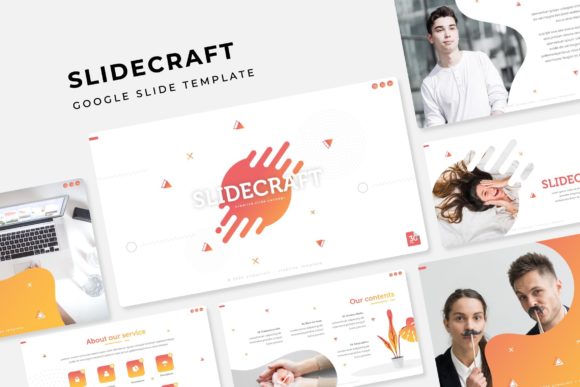
What makes this more than just another set of slides is the thought put into real-world use. The templates include handcrafted infographics, section breaks, portfolio slides, and resizable graphics. Every slide is based on master slides, which means changes you make to one layout can apply across the whole deck if you want. And because all illustrations are pixel-perfect, they look sharp whether you present on a laptop or a widescreen monitor.
Why the Same Template Works for Different People
Not everyone who opens Google Slides has the same goals. A marketer preparing a quarterly review cares about different things than a teacher building a lesson module. The Slidecraft package addresses those varied needs without forcing you into a single style. Here is how different audiences might approach it and what they end up valuing most.
Beginners and First-Time Presenters
If you are new to making slide decks, the biggest hurdle is often getting the design right. You might spend more time aligning boxes and choosing fonts than actually writing the content. With Slidecraft, you get 30 slides per color theme, each already balanced in layout. The picture placeholders work by simple drag and drop, so you can add your own images without worrying about cropping or sizing. There is also a Readme file that includes a link to download the free fonts used, which saves you the trouble of hunting down missing typefaces.
For a beginner, the main priority is speed and ease of use. The template removes the guesswork from formatting. You can open a file in one of the five premade colors, start replacing placeholder text with your own, and have a coherent presentation in less than an hour. That is especially useful if you need to create a talk for a volunteer group, a school project, or a local meetup.
Experienced Creators and Freelancers
For someone who regularly pitches ideas or builds portfolios for clients, consistency matters as much as creativity. The Slidecraft Google Slide Template provides 5 PPTX files with widescreen aspect ratios, each using one of the five color variations. That means you can choose an accent that matches a client’s brand without redesigning the entire deck. The infographic slides are a standout feature here: handcrafted icons and diagrams let you present data in a visually clear way without needing advanced graphic design skills.
A freelancer might use the portfolio slide to showcase past work, then quickly adapt the same layout for a different client by switching the color theme. The resizable and editable graphics also help when you need to tweak an illustration to fit a specific concept. You are not locked into a rigid template; instead, you have a starting point that you can bend to your needs. This blend of structure and flexibility saves time and keeps your presentations looking professional across different projects.
Business Owners and Entrepreneurs
When you run a small business, every asset should serve multiple purposes. The same template that you use for a sales pitch can also work for an investor update or a team meeting. Because Slidecraft includes 150 slides across several variations, you can build a library of internal and external presentations without starting over each time. The section break slides help organize longer decks, which is handy when you are walking through different revenue streams or product lines.
For entrepreneurs, the long-term usefulness is a key factor. Good templates age well. The minimal, pixel-perfect illustrations do not rely on trendy design elements that go out of style quickly. And because the files are based on master slides, you can update the entire deck’s look later by adjusting just the master or by reapplying a different color theme. This means you might use the same template for years, only refreshing the content and images as your business evolves.
Educators and Trainers
Teachers and professional trainers often need to present complex information in an accessible way. The handcrafted infographics in the Slidecraft template are particularly useful here. You can explain a process with a flowchart, highlight key statistics with a data visual, or break down a timeline with a dedicated layout. The variety of slide types helps you avoid the monotony of text-heavy slides.
If you teach multiple courses, the five different color variations let you visually separate topics or class levels. For instance, you might use one color for lecture materials and a different color for workshop handouts. The drag-and-drop picture placeholders make it simple to include diagrams or student project samples. And because all graphics are resizable, you can adjust them to fit your specific teaching material without losing quality.
What to Look For Before Choosing a Template
Not every presentation template is created equal. When you evaluate the Slidecraft Google Slide Template, consider these aspects based on your own skill level and project type.
- Ease of use: For beginners, the drag-drop placeholders and prebuilt master slides are a huge time save. You do not need to learn advanced slide design to get good results.
- Quality of graphics: The pixel-perfect illustrations and handcrafted infographics matter for anyone who presents to clients or colleagues. Blurry or inconsistent graphics hurt your credibility.
- Flexibility: The five color themes and 150 slides give you room to adapt. If you often present to different organizations, having a variety of looks in one package saves the hassle of buying multiple templates.
- Commercial value: Small business owners and freelancers should check if the license covers commercial use (the description does not restrict it, but always verify). The ability to reuse the same template for multiple client projects increases its worth.
- Learning value: If you are a designer-in-training, studying how these slides are structured using master slides can teach you good habits in Google Slides or PowerPoint.
Practical Examples of Using the Template
To see how the Slidecraft package works in real scenarios, here are a few examples:
- Blogger creating a media kit: You can use the portfolio slide to show your best posts, the infographic slides to highlight traffic numbers, and the section breaks to separate “About” from “Services.” The premade color ensures your media kit matches your blog’s branding.
- Startup founder pitching to investors: The 150 slides give you room to build a detailed deck that covers problem, solution, market size, and financial projections. You can use one color scheme for the main pitch and a different one for the appendix slides, keeping everything cohesive but distinct.
- Hobbyist making a photo album presentation: The picture placeholders make it easy to swap in family photos or travel shots. You can choose a warm color variant and use the clean layouts to let the images stand out without cluttered backgrounds.
These examples show that the template adapts to the user, rather than the other way around. The key is to identify what you need most—whether it is speed, consistency, or visual variety—and then use the corresponding parts of the package.
Is This Template Right for You?
Before you download a template, it helps to match its features with your own workflow. If you often start a presentation by worrying about fonts and alignment, the Slidecraft Google Slide Template will remove that friction. If you need to produce decks for multiple brands or courses, the five color variations give you that range without buying separate templates. If you value clean, pixel-perfect graphics that you can resize without distortion, the package delivers on that front as well.
On the other hand, if you need highly animated slides or complex data dashboard layouts, this set might feel too static for your vision. It is designed for clarity and flexibility, not for flashy motion graphics. Similarly, the photographs shown in the preview are not included—they are for illustration only. You will need to supply your own images, which is common with professional templates but worth noting if you wanted a ready-to-use image bank.
For most users—beginners, professionals, educators, and business owners—the template strikes a solid balance between structure and customization. It respects your time by giving you a foundation to build on, and it respects your creativity by letting you adapt that foundation to your own needs.
When you open one of the 5 PPTX files, you will find slides that are ready to go. The Readme file explains the font links and any usage notes. The rest is up to you: drag in your photos, type your headlines, and rearrange the order of slides as you like. With 150 slides at your disposal, you are unlikely to run out of layouts for a single deck, and you can easily mix slides from different color files if you want a custom palette.
Choosing a presentation template is about more than just looks. It is about finding a tool that supports how you work and the messages you want to deliver. Slidecraft offers that support through practical features like master slides, editable graphics, and multiple color options. Whether you are preparing a one-time talk or building a library of recurring presentations, it can save you time and improve the final product.