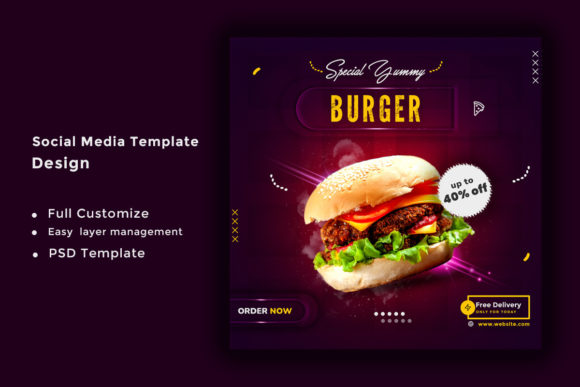
How a Product Sale Social Media Post Template Can Streamline Your Marketing Workflow
Creating effective social media content for product sales often feels like a race against time. You need eye-catching visuals, clear messaging, and consistent branding — all while managing multiple product launches or seasonal promotions. Without a solid foundation, each post becomes a new design challenge, eating into hours that could be spent on strategy, customer engagement, or growing your business. That is where a Product Sale Social Media Post Template becomes more than just a design file; it becomes a reliable system for producing professional, high-converting content quickly.
Why Most Product Sale Posts Fall Short
Many business owners and marketing teams struggle with the same recurring problems when promoting products on social media. The most common challenge is inconsistency. One post might use a bold font, while the next relies on delicate script lettering. One image might be cropped tightly, while another leaves too much empty space. This inconsistency dilutes brand recognition and makes your feed feel disjointed.
Another frequent pain point is time waste. Starting from scratch for every single promotion means making countless micro-decisions about layout, color balance, text placement, and file resolution. These decisions add up, turning a simple product announcement into a thirty-minute design session. Multiply that by several products or platforms, and you lose hours each week.
Then there is the technical hurdle. Not everyone has a graphic design background. Trying to align text, maintain proper DPI, and ensure RGB color accuracy can be intimidating. This often leads to either outsourcing every post (which costs money) or posting subpar graphics that fail to capture attention in crowded feeds.
What Makes a Product Sale Social Media Post Template Different
A Product Sale Social Media Post Template is a pre-designed file that gives you a structured starting point for your promotional content. Instead of designing from scratch, you open a file that already has the right dimensions, color scheme, typography hierarchy, and visual balance built in. You then swap in your specific product image, adjust the sale details, and publish.
The best templates are delivered in formats like PSD (Photoshop) so you can make deep customizations without breaking the design. A high-quality template also comes with specifications that matter for professional output: a generous 2000px x 2000px size that works beautifully across Instagram, Facebook, LinkedIn, and even print materials; 300 DPI resolution for sharp, crisp visuals; and RGB color mode optimized for digital screens. When you choose a template that includes free font use, you avoid the hassle of licensing restrictions or missing typefaces. And with high regulation standards built into the design, you can trust that the file will behave predictably across different software versions.
How Different Users Get the Most Out of Templates
No two businesses use a Product Sale Social Media Post Template in exactly the same way, and that flexibility is one of its strongest advantages. Small business owners, for instance, often have to wear every hat — marketer, designer, photographer, and salesperson. For them, a template removes the design guesswork entirely. They can focus on writing compelling copy and taking strong product photos, knowing the template will make them look polished.
Marketing teams at growing companies use templates differently. They often need to produce a high volume of posts for multiple product lines or flash sales. A template ensures that every post adheres to brand guidelines, even when different team members are creating content. This consistency builds trust with the audience over time. Teams also appreciate the fully customizable file aspect, which allows them to adjust colors to match seasonal campaigns or tweak layouts for A/B testing.
Freelance social media managers and agencies benefit from templates as a scalability tool. Instead of designing each client post individually, they can maintain a library of proven templates and adapt them per client. This speeds up turnaround times and helps them serve more clients without sacrificing quality. The quick design changes capability means they can make last-minute adjustments to pricing, dates, or product imagery without starting over.
Practical Applications That Drive Results
Let’s look at how a Product Sale Social Media Post Template translates into real-world outcomes. Imagine you are launching a weekend flash sale. With a template, you can create a series of posts in under an hour: one announcement post, one product highlight post, one urgency-based post for the final hours, and maybe a story version. Each post maintains visual coherence, so your audience recognizes the campaign instantly as they scroll.
Another powerful application is seasonal promotions. A template designed with high resolution and proper RGB color allows you to reuse the same structure for holiday sales, back-to-school offers, or anniversary events. You simply update the product image, change the background color to match the season, and adjust the sale percentage. The underlying layout remains strong because it was built with proper spacing and typographic hierarchy from the start.
Outcomes often include higher engagement rates and more conversions. When your posts are consistently on-brand and visually appealing, followers are more likely to stop scrolling, read your offer, and click through to your store. A template also reduces the likelihood of embarrassing mistakes like pixelated images or text that gets cut off on mobile devices — issues that can damage credibility.
Key Considerations When Choosing a Template
Not every template delivers the same value. To truly streamline your workflow, look for one that includes the 2000px x 2000px pixel size. This square format dominates platforms like Instagram and performs well on Facebook and LinkedIn feeds. It is large enough to showcase product details clearly without feeling cramped.
The PSD file format is a gold standard for customization because it preserves layers, effects, and smart objects. You can turn elements on and off, adjust opacity, and fine-tune every component without degrading the original design. Avoid flattened file formats if you expect to make frequent edits.
Check that the template uses 300 DPI. While 72 DPI might be fine for quick social posts, 300 DPI ensures your graphics look sharp on retina displays and can even be repurposed for print materials like flyers or signage. It future-proofs your content.
Always verify that the fonts used are free for commercial use. Some templates rely on expensive or restricted typefaces that require separate purchase. A template that uses free fonts saves you from legal headaches and additional costs. Additionally, ensure the file is built in RGB color mode for accurate on-screen color representation.
Look for a design that offers high regulation in its layer structure. This means cleanly named layers, organized groups, and non-destructive editing. A well-regulated file is easier to navigate, especially if you are not a professional designer. It also performs reliably when opened in different versions of design software.
The ability to make quick design changes is essential. The best templates use smart objects for images, so you can replace a product photo by double-clicking one layer instead of manually masking and resizing. Text layers should be editable with live type, allowing you to update prices and headlines in seconds.
Turning a Template Into a Complete Campaign
Once you have a solid Product Sale Social Media Post Template, you can build entire campaigns around it. Start by selecting a core template that reflects your current brand style. Use it as the anchor for your campaign. Create variations — one with a product close-up, another with a lifestyle shot, and a third with a testimonial overlay. This variety keeps your feed fresh while maintaining visual harmony.
Pair your template with strong copywriting. The design gets attention, but the words drive action. Use your headline space to state the offer clearly. Use the body text area for details like discount percentages, expiration dates, or limited stock warnings. A well-balanced template gives you designated zones for each type of information, so your message stays organized and easy to read.
Consider creating a short series of posts that tell a story across a week. Day one introduces the upcoming sale with a teaser. Day two showcases a specific product image within the template. Day three reveals the discount and creates urgency. Each post uses the same template structure but different imagery and copy, creating a campaign that feels cohesive and professional without requiring new designs every day.
Why This Approach Works Better Than Starting from Scratch
Starting every social media post from a blank canvas is like cooking every meal without a recipe. It is possible, but it is inefficient and the results vary widely. A Product Sale Social Media Post Template acts as your proven recipe. It standardizes the layout, the color balance, the typography scale, and the image treatment. You still have creative freedom to customize, but you are building on a foundation that already works.
This approach also makes it easier to analyze performance over time. When all your sale posts follow a similar structure, you can compare them more fairly. You might notice that posts with a certain color accent or text placement consistently get more clicks. With a template, you can make small adjustments to the file and keep testing what resonates with your audience. Over time, you refine not just the template, but your entire promotional strategy.
For business owners and marketers who value their time, a template is a practical investment. It reduces decision fatigue, speeds up production, and allows you to focus on the parts of marketing that truly require human creativity — like crafting compelling offers, connecting with customers, and building a brand story that resonates.
Getting Started with Your Template Right Now
The best time to implement a Product Sale Social Media Post Template is before your next promotion. Choose a design that reflects your brand’s visual identity but also offers flexibility for different types of sales. Download the PSD file, open it in your design software, and familiarize yourself with the layer structure. Replace the placeholder image with a product photo you already have. Update the text with a current offer. Within minutes, you will have a professional post ready to schedule.
As you use the template repeatedly, you will discover which elements you want to adjust for different campaigns. You might create a version with a bold background for clearance sales and a softer version for premium product launches. The template becomes a starting point that you evolve over time, rather than a rigid box.
Remember that images are not included in the main template file, so you have complete freedom to use your own product photography, stock images, or user-generated content. This ensures every post feels authentic to your brand while benefiting from the structural excellence of a professionally designed template.
Whether you are a solopreneur posting from your phone or a marketing team managing multiple product catalogs, a thoughtfully crafted Product Sale Social Media Post Template gives you a repeatable system for creating content that looks great, communicates clearly, and drives sales. It turns the chaotic process of promotion into a smooth, dependable workflow — and that makes all the difference in a fast-moving social media landscape.